


Is there a universal remote code for the FreeAgent Theater +?
No. Universal remote codes are provided by the remote controller vendor.
Are there any other remotes that I can use with the FreeAgent Theater +?
- iPhone remote app (see Document ID: 217771 for more information)
- Logitech's Harmony remotes
- Most IR learning remotes
Yes. Most inexpensive infrared (IR) learning remotes can be programmed button-by-button to work with the product. Any technical support would come from the remote control manufacturer.
Logitech's Harmony remotes are programmed to function with the FreeAgent Theater +.
For more on this remote :
- Visit http://www.logitech.com/en-us/remotes
- At the bottom of the page click on 'Check compatibility now'.
- Device = Computer -> Media Center PC
- Manufacturer = Seagate
- Model = FreeAgent Theater+
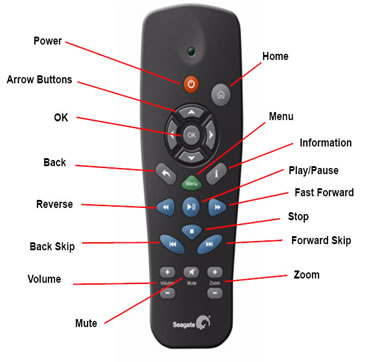
|
|
|
|
Arrow Buttons: Press to navigate left, right, up, and down through the menus. |
Menu: Display the menu that contains options for the screen currently displayed on your TV. |
|
OK: Confirm a menu selection. |
|
|
|
|
|
|
|
|
|
|
|
|
|
|
Volume + -: Increase or decrease volume. |
Zoom + -: Zoom in or out when playing pictures or movies. Press repeatedly to select higher zoom levels. |
 Power: Turn the media player on and off.
 Home: Return to the home screen from any other screen.
 (Information): Get information about the content currently displayed on your TV.
 (Back): Move one step back to the previous screen.
 (Play/Pause): Play or pause movies, music, and pictures.
 (Fast Reverse): Fast reverse the current playback. Press repeatedly to select faster reverse speeds.
 (Fast Forward): Fast forward the current playback. Press repeatedly to select faster forward speeds.
 (Back Skip): Return to the previous file when playing music or viewing pictures or to the previous chapter in a movie.
 (Stop): Stop playback.
 Mute: Press to mute audio output; press again to resume audio.
 (Forward Skip): Go to the next file when playing music or viewing pictures or to the next chapter in a movie.


